StudentSquare
- 3.3
- Rating
- 100.00K
- Installs
- Free
- Price
 Analysis by App-foxy
StudentSquare is the kind of education app that makes sense only when a school has chosen to use it as part of its communication routine. I approached it less like a general-purpose social app and more like a private noticeboard that travels with a student. In that role, it can reduce the need to search through scattered messages, but its usefulness depends heavily on how consistently the school and teachers use the platform.
Developed by ParentSquare, this free education app is aimed at keeping student-facing communication inside a school-controlled space. It is available to everyone from an age-rating perspective, runs on Android devices using version 7.0 or later, and has reached over 100 thousand installs. The current version is 2.116.0, while its average score sits at 3.3 from around 871 ratings. Those figures suggest a tool with a real user base, but also one that has not been universally smooth for everyone.
How StudentSquare fits into a student’s daily routine
I find it helpful to treat StudentSquare as a scheduled check-in rather than something that needs attention every few minutes. A student can review school messages after classes, then turn any dates or tasks into reminders in the tool they already use. That simple split keeps the school channel focused and makes it easier to see where household coordination needs a clearer routine.
You May Also Like

 Blood Strike: 2.5 Anniversary
Blood Strike’s Loadouts Turn Every Drop Into a Tactical Gamble
A close look at Blood Strike’s custom loadouts: how fast access to signature weapons reshapes its battle royale rhythm, rewards preparation, and narrows the gap between fights.

 Pandora - Music & Podcasts
Pandora’s Music Is Easy to Start, but Harder to Recover
Pandora’s strength is its low-effort path from a seed to a station. Its weak spot is how much confidence it asks you to place in connection, setup, and quiet recovery.

 8 Ball Pool
 Is Built on Rivalries, Rematches, and Routine
A close look at the rivalries, rematches, shared routines, and unanswered safety questions that turn a quick pool match into a persistent mobile community.

 Samsung Music
’s Quiet Strength Is Playing What You Already Own
Its reach comes less from spectacle than from dependable access to a personal library. That simplicity is both the app’s strongest retention engine and its ceiling.

 AccuWeather: Weather Radar
AccuWeather Review: A Quick, Clear Forecast for Everyday Decisions
For everyday plans, the best forecast is the one you can understand quickly. AccuWeather makes rain timing, radar, and local conditions easy to act on, with a few trade-offs.

 Hill Climb Racing
Why Hill Climb Racing Still Turns Crashes Into One More Run
A tiny car, a bumpy hill and one more upgrade: Hill Climb Racing keeps resurfacing because its simple chaos makes every near-miss feel personal.
More From Our News Desk



A private channel rather than another public social network
The central idea is straightforward: StudentSquare gives schools a private communication platform for students. That distinction matters. A student is not opening it to browse entertainment or chat with a broad online community. The reason to check it is practical: school-related information, messages, reminders, or other communication that belongs within the school environment.
In my view, the best way to think about it is as a companion to the school’s existing communication habits. It may replace some paper notices or reduce dependence on email, but it does not automatically replace every system a school uses. A school might still rely on a separate learning platform for assignments, a calendar for dates, or email for formal records. StudentSquare is most useful when it becomes the place students know to check for timely communication, rather than being added as one more disconnected app.
That makes the first setup question especially important: is the student’s school actively using it? If the answer is yes, the app has a clear purpose. If the school barely posts there, installing it will not create value by itself. This is not an independent study tool with lessons waiting for anyone to start. Its usefulness comes from the school community around it.
What I liked about the focused design
I appreciate the narrow focus because it avoids turning school communication into a noisy stream of unrelated content. A student opening a private school platform usually has a specific reason for being there. That can make checking messages feel more purposeful than searching through a crowded inbox where school notices compete with personal mail, promotions, and unrelated conversations.
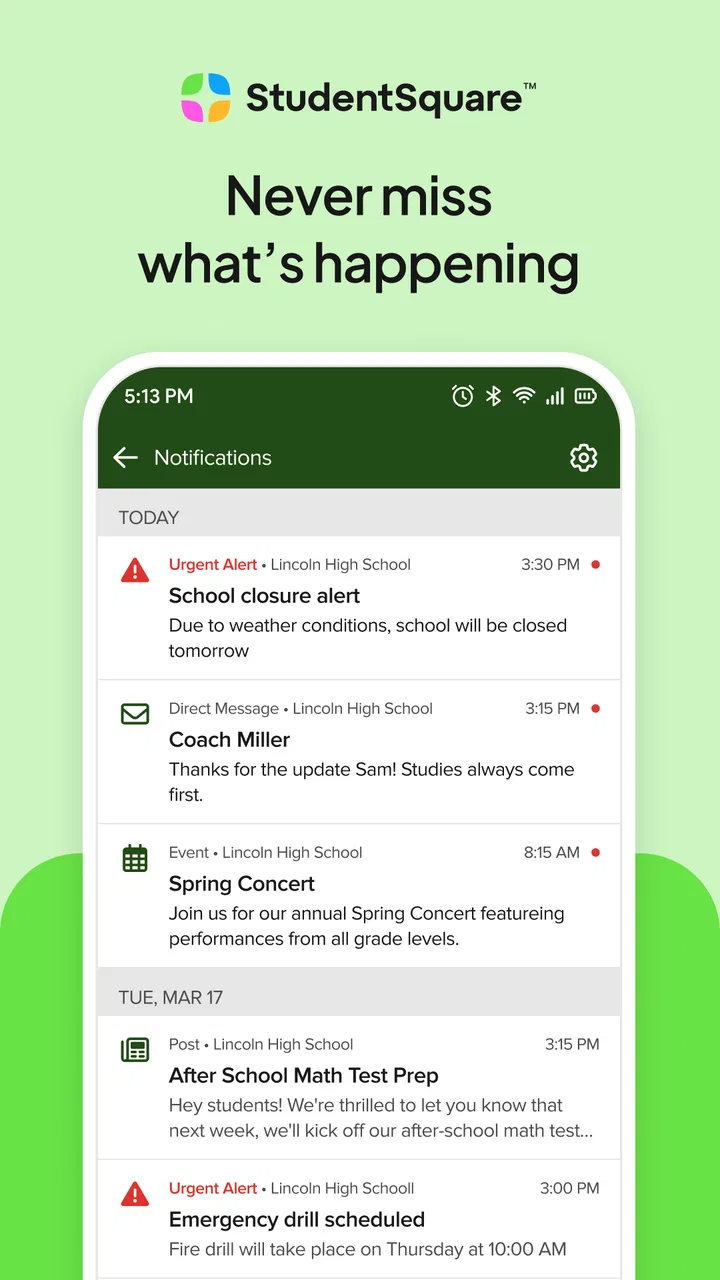
There is also a useful boundary between personal communication and school communication. Keeping school messages in a dedicated app can make it easier to remember where to look when a teacher, office, or school group sends something important. For families and students who regularly miss announcements because they are spread across several channels, that single destination can be a meaningful improvement.
My practical advice is to treat the app as a routine, not an emergency inbox. Check it at a predictable point in the day, especially after school or before the next school day begins. That habit is more reliable than assuming every message will be noticed immediately. It also helps students separate genuinely useful school updates from the general stream of phone notifications.
Where the experience can become frustrating
The same focused design creates a limitation: there is little reason to open StudentSquare when the school does not communicate regularly through it. Students may install it, see very little activity, and conclude that the app is unhelpful, even though the real issue is adoption by the institution. That dependence is a central trade-off and should be clear before anyone expects it to behave like a complete school-management system.
The average rating of 3.3 indicates a mixed experience across its user base. I would not interpret that score as proof that the app is unusable, but I would take it as a reason to keep expectations realistic. Communication apps are judged not only by their interface, but also by account setup, message timing, device behavior, and how well the school’s workflow fits the platform. A polished screen cannot compensate for unclear school procedures.
Students should also remember that a school communication app is not necessarily the right place to store every important piece of information. If a message contains a date, instruction, or requirement that matters later, I would copy it into a personal calendar or notes system. That small extra step protects against the common problem of remembering that an announcement existed but not being able to find it quickly when needed.
Useful workflows for students and families
One realistic example is a student who gets home and needs to know whether the next day includes a changed arrangement. Instead of asking classmates across several private chats, the student can first check the school’s official communication channel. If the school has posted the update there, StudentSquare becomes the quickest way to confirm the information. If nothing appears, the student then knows to use the school’s established backup contact rather than assuming that silence means there is no change.
A second useful workflow is separating action items from background information. When reading a message, I would immediately identify three things: what needs to happen, who needs to act, and when it matters. Writing those details elsewhere is especially helpful for students who receive several notices close together. The app can deliver the communication, but the student still needs a personal system for turning messages into completed tasks.
For families, the practical benefit is consistency. If a parent and student both know that StudentSquare is the first place to check for school communication, fewer notices become dependent on a student remembering to forward them. That does not eliminate misunderstandings, but it creates a clearer household routine. The trade-off is that everyone needs to agree on which channel is considered official for everyday updates.
A third insight is that notification habits deserve attention. Leaving every alert enabled may make important messages disappear into a constant flow of minor updates, while disabling everything can defeat the purpose of having the app. I would begin with normal notifications, observe how often the school uses the platform, and then adjust only if the volume becomes distracting. The best setting is the one that keeps the app visible without making it irritating enough to ignore.
How it compares with familiar alternatives
Compared with ordinary email, StudentSquare can feel more focused because school communication is separated from personal correspondence. Email remains better when a student needs searchable records, attachments organized over time, or communication with people outside the school’s platform. For formal exchanges, many users may still prefer email’s familiar structure.
Compared with a learning-management system, StudentSquare appears more centered on communication than on the full academic workflow. A learning platform is usually the stronger choice for organizing lessons, submissions, grades, and course materials when those functions are available there. StudentSquare makes more sense for school-wide or student-directed communication than as a replacement for a complete classroom workspace.
Compared with group messaging apps, its main advantage is the private school context. A class chat may be faster for informal questions, but it can also be incomplete, distracting, or dependent on which students happen to participate. A school-controlled channel is better suited to information that should reach the intended student audience consistently. I would still use a class chat for quick peer discussion if the school permits it, but I would not treat that chat as the authoritative source for important notices.
Compared with paper notices, the app is easier to check away from home and less likely to disappear at the bottom of a backpack. Paper can still be useful for families who prefer a physical reminder or who do not check phones frequently. StudentSquare is therefore not automatically superior in every household; it is strongest where students already use their phones responsibly and the school has committed to digital communication.
What the current version tells existing users
The current version, 2.116.0, shows that the app is still being maintained as a live product rather than left as an abandoned download. That is encouraging for existing users, because communication tools need ongoing attention even when their basic purpose remains simple. Updates can help preserve compatibility and keep the experience usable as mobile operating systems change.
At the same time, a version number alone does not tell me that every complaint has been resolved or that every school workflow will feel modern. Existing users should judge an update by the things that matter in daily use: whether opening messages is dependable, whether alerts arrive in a useful way, and whether the app remains easy to understand when several notices appear together. I would install updates through the normal app-store process, but I would not assume that a newer version changes the school’s communication habits.
The release date of October 24, 2018 places StudentSquare in a product history that spans several years. That helps explain why some users may experience a mixture of established behavior and newer refinements. Long-running apps can be valuable because they have had time to mature, yet they can also carry design decisions that feel less natural to people accustomed to newer messaging tools.
For someone already relying on the app, the sensible approach is gradual rather than disruptive. Keep the existing routine, update when prompted, and note whether the behavior of notifications or message access changes after an update. If a student depends on the app for time-sensitive school communication, it is wise to maintain a second personal reminder system instead of assuming that one application will always be available at the exact moment it is needed.
Who will benefit most, and who should skip it
StudentSquare is a good fit for students whose schools actively use ParentSquare’s platform and expect students to check it. It is also useful for families trying to create one recognizable place for school announcements. The free price removes a purchase decision, and the Everyone age rating makes it broadly approachable for the intended school audience.
I would be more cautious if you are looking for a complete academic organizer. The app should not be your only choice if your main need is assignment management, detailed course planning, grade tracking, or long-term document organization. A dedicated learning platform, calendar, or notes app may serve those jobs better. StudentSquare can sit beside those tools, but expecting it to replace all of them is likely to lead to disappointment.
It may also be a poor fit for students who rarely check notifications or who do not have a reliable phone routine. In that situation, the school should provide a clear alternative communication method, because simply installing the app will not solve missed messages. Likewise, if a school communicates primarily through another service, StudentSquare may add confusion instead of reducing it.
Remaining gaps and sensible expectations
The biggest gap is not necessarily a missing button; it is the dependence on shared behavior. A communication platform works only when the school, staff, students, and families agree how it should be used. If one group posts in the app, another sends email, and a third relies on paper, the student still has to monitor several channels. The app can centralize communication only to the extent that the institution actually centralizes it.
Another limitation is that a message stream is not the same as a personal plan. Even when StudentSquare delivers information clearly, students still need to remember deadlines, prepare materials, and follow instructions. I recommend turning important notices into calendar entries immediately, especially when the announcement concerns an event several days away. This is a small habit, but it is one of the most useful ways to avoid treating the app as a passive archive.
There is also a human factor. Students may understand a message differently from parents or staff, particularly when a notice assumes background knowledge. If an announcement is unclear, the best response is not to guess based on a partial reading. Save the relevant details, ask the school through its preferred contact method, and use the app as the reference point for what was actually communicated.
What I would watch going forward
For future use, I would watch how consistently the platform supports the basic promise of private school communication. The important signs are practical: messages should remain easy to locate, alerts should be useful rather than overwhelming, and the experience should stay approachable for students who are not especially technical. These details matter more than adding complexity for its own sake.
I would also pay attention to how the app fits alongside other school systems. The best experience will come when students understand which tool is used for announcements, which one handles coursework, and which channel is appropriate for direct questions. Clear boundaries reduce duplicate messages and prevent students from searching in the wrong place.
My overall view is cautiously positive. StudentSquare is not a universal education solution, but it has a sensible role when a school uses it as a dependable private communication channel. I like the idea of giving students a dedicated place to check school information, and the free access makes trying it straightforward. Still, the mixed average rating and the app’s dependence on school participation mean I would recommend it as part of a communication routine, not as the only system a student uses.
If your school has adopted it seriously, I would install it, keep notifications under control, and pair it with a calendar for anything that requires action. If your school barely uses it or already has a clearer official channel, I would avoid adding another inbox to your day. The real value of StudentSquare comes from disciplined, consistent use—not from the installation alone.
FAQs for StudentSquare
01What is StudentSquare, and who is it designed for?
StudentSquare is a school communication app that helps students and families stay connected with teachers, schools, and district administrators. It can be used to receive announcements, review class or school updates, check messages, and follow important events. Availability and features may vary depending on whether the student’s school or district has enabled StudentSquare for its community.
02How do I sign in to StudentSquare?
In most cases, you sign in using the contact information already registered with your school, such as an email address or mobile phone number. Some schools may provide an invitation, access code, or specific login instructions. If your details are not recognized, contact the school office or district administrator, because access is generally managed by the participating school rather than created independently by the user.
03What notifications can I receive through StudentSquare?
StudentSquare may send notifications about school announcements, attendance, grades, assignments, events, schedule changes, emergency messages, and direct communication from teachers or administrators. The exact categories depend on the services activated by your school. You can usually adjust notification preferences on your device or within the app, but disabling alerts could cause you to miss time-sensitive information.
04Is StudentSquare free to download and use?
StudentSquare is generally available as a free download for students and families, with access provided through participating schools or districts. However, downloading the app does not automatically guarantee access to every feature. Your school must use the platform and associate your account with its records. Standard mobile data charges may still apply when using the app away from Wi-Fi.
05Is StudentSquare safe for communicating with my school?
StudentSquare is intended for education-related communication and typically uses school-managed accounts and permissions to connect users with authorized teachers, staff, and administrators. Even so, you should keep your login information private, use a device lock, and check messages carefully before sharing personal details. Privacy options and data practices can differ by school, district, and local regulations.
Pros
- Direct access to school announcements
- updates
- and important reminders.
- Private messaging helps families communicate with teachers and school staff.
- Push notifications can keep users informed about schedule changes quickly.
- Supports multiple children and schools from one convenient account.
- Useful calendar and activity information helps organize the school day.
Cons
- Some features depend on the school’s setup and may not be available.
- Notification volume can become overwhelming during busy school periods.
- The interface may feel crowded when several schools or children are linked.
- Messages and updates can be difficult to find after extended use.
- Requires an active school or district account to provide meaningful content.

StudentSquare
Gallery